
 growthwright
The short answer
Post things that help a customer decide to buy from you. That's it. Not motivational quotes, not "Happy Tuesday!", not a blurry photo of your desk. Every post should do at least one of these jobs:
- Sell: an offer, a menu, a price, a service.
- Prove: show you're good at what you do and safe to hire.
- Help: a tip that makes you look like the expert.
- Remind: keep you in mind for when they need you.
If a post doesn't do one of those, skip it.
Content pillars: never run out of ideas
A content pillar is just a theme you come back to again and again. Pick four or five, rotate through them, and you'll never stare at a blank screen wondering what to post. Here are the ones that work for most small businesses:
| Pillar | What it is | Trade example | Food example |
|---|---|---|---|
| Offers and products | What you sell and why now | "Boiler service slots this month" | Lunch deal, new dish, discount |
| Proof and trust | Why you're safe to choose | Accreditations, insurance, finished jobs | Reviews, hygiene rating, busy service |
| Helpful tips | Quick expert advice | "3 signs your roof needs checking" | "How to reheat pasta properly" |
| Behind the scenes | The people and process | Kit, team, a day on site | Kitchen prep, fresh ingredients |
| Seasonal and local | Dates and events that matter | Winter prep, bank holidays | Christmas menus, Valentine's, school holidays |
Write ten ideas under each pillar once, and you've got the best part of three months of posts sorted.
A simple 4-post weekly plan
Four posts a week is enough to stay visible without becoming a full-time job. Here's a plan you can copy:
| Day | Pillar | Example post | Call to action |
|---|---|---|---|
| Monday | Helpful tip | One useful tip with a bold headline | "Save this for later" |
| Wednesday | Proof and trust | Accreditation, finished job, or a customer review (with permission) | "Get a free quote" |
| Friday | Offer or product | Weekend deal, menu, or a service you want to push | "Call / book / order now" |
| Saturday or Sunday | Behind the scenes or seasonal | Team, kit, prep, or what's coming up | "Follow for more" |
Change the days to fit your business. A takeaway wants its offers on Thursday and Friday before the weekend rush. A tradesperson might do better early in the week when people are planning jobs.
Rather not do it yourself? I design, write and schedule 4 infographic posts a week on Facebook and Instagram for £150 a month. See my social media posts service
Infographic post types that work
People scroll fast. A post with a clear headline and a few words gets its point across before the thumb moves on. These are the formats I use most:
- The offer card. Big price or deal, a photo of the thing, one line of detail. "Buy one get one free", "20% off collection".
- The menu or price list. Clear, readable, everything on one image. Great for restaurants and for trades with fixed prices.
- The hero product. One dish, one finished job, one product, shot well, with a short headline.
- The trust card. Your accreditations, insurance, safety kit, years trading (only if true). It answers "can I trust them?"
- The tip. A headline and three short points. Easy to save and share.
- The seasonal post. Christmas menus, bank holiday hours, summer deals. Timely posts give people a reason to act now.
Real examples from real clients
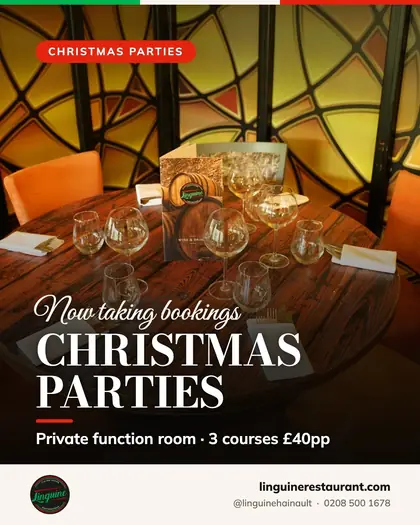
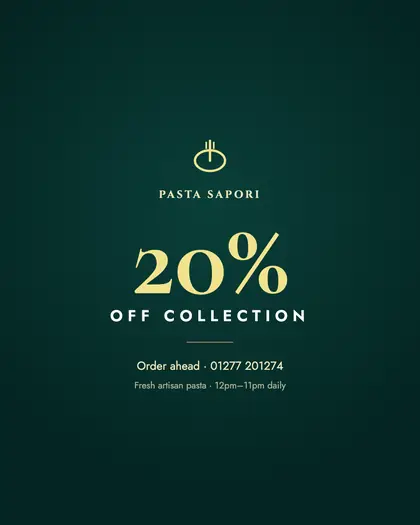
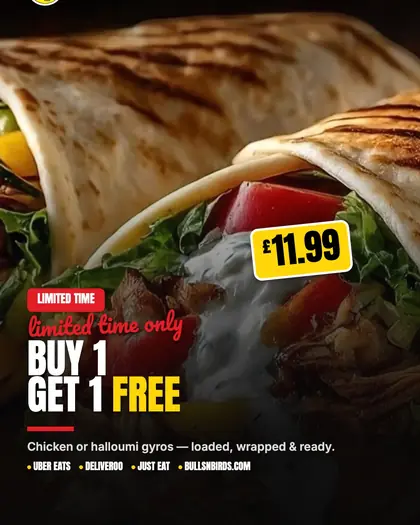
These are real posts I've made for clients: Avalon Pro (rope access), Linguine (restaurant), Pasta Sapori (Italian takeaway in Brentwood) and Bulls n Birds (takeaway). Notice how each one says a single thing.





What's going on in these
- Avalon Pro is a rope access business, so the posts lean on proof: the work itself, safety and PPE, and accreditations. When a building manager is choosing who to put on a rope, trust is the whole sale.
- Linguine uses seasonal posts: Christmas parties, the festive lunch menu, Christmas Day and festive drinks. Seasonal posts give people a deadline, which nudges them to book.
- Pasta Sapori mixes hero dishes, like the carbonara and cacio e pepe, with clear offers like 20% off collection and a lunch deal. Mouth-watering photo, then a reason to order.
- Bulls n Birds goes bold with offers and products: a BOGOF on gyros, a burger, mocktails. Simple, loud, impossible to misread.
Consistency beats going viral
Most small businesses don't need a viral post. They need to be the name people remember when the boiler breaks or it's Friday night and nobody wants to cook. That comes from turning up week after week.
- Pick a number of posts you can keep up for a year, not a week.
- Use the same colours, fonts and logo placement so people recognise you before they read the name.
- Don't vanish for a month then post ten times in a day.
- Reply to comments and messages. A quick reply is part of the post.
How to write captions people read
- Lead with the point. Only the first line or so shows before "more". Make it count: "Lunch deal, £X, 12 till 3."
- Keep it short. Two to four short lines is plenty for most posts.
- Sound like you. Write the way you'd talk to a customer at the counter.
- One call to action. Call, book, order or message. Not all four.
- Make it easy. Include the phone number, link or "order via the link in our bio".
- Hashtags lightly. A few relevant ones, like your town and your trade, rather than a wall of thirty.
Scheduling: do it once a week, or once a month
The easiest way to stay consistent is to stop posting "live". Sit down once, make the posts, and schedule them. Meta Business Suite lets you schedule Facebook and Instagram posts for free. Other scheduling tools exist if you post on more platforms.
- Batch your content: take photos when the work is happening, design posts in one sitting.
- Schedule at times your customers are on their phones. Your page insights will show you when your followers are active.
- Leave a little room for last-minute posts, like "two slots left this week" or a sold-out special.
Social works best alongside the rest of your marketing. Posts get you noticed, but people still check your Google reviews and website before buying. See how to get more Google reviews and how to rank your Google Business Profile.
What not to post
Knowing what to skip is half the job. These posts tend to fill your feed without bringing in customers:
- Generic quotes and memes that any business in the country could post. They don't say anything about you.
- Walls of text on an image. If it takes longer than a couple of seconds to read, most people won't.
- Blurry or dark photos. A phone in good light is plenty. Wipe the lens and step outside if you need to.
- Customer photos or reviews without permission. Always ask first.
- Prices or offers that are out of date. Delete or update old offer posts so nobody turns up expecting last month's deal.
- Arguments in the comments. Reply to complaints politely and take the detail to a private message or a phone call.
How I can help
If you'd rather run your business than run your Instagram, my social media posts service is £150 a month for 4 infographic posts a week, designed, written and scheduled on Facebook and Instagram. You send me photos and news when you have them, I do the rest. And if your posts are sending people to a website that lets you down, my £25 a month websites fix that too.
Want posts like these for your business? Tell me what you do and I'll show you how I'd plan your first month. Start my social posts